
Local Services Ads have a simple pitch: you pay for leads, not clicks. But the billing rules are changing.
If a customer calls during your business hours and active ad schedule, nobody answers, and the caller stays on the line for more than 20 seconds, that call can count as a charged lead, even if it reaches voicemail.
That's one of several changes advertisers need to understand. Google replaced the Google Guaranteed badge with Google Verified, moved from manual lead disputes to automatic credit reviews, and began moving Local Services Ads into Google Ads as a pay-per-lead Performance Max campaign type.
Think of it as moving day. Google is moving Local Services Ads into a new house. Your leads are coming along, but your old reports are not.
I've managed Local Services Ads for home improvement, HVAC, junk removal companies, criminal, bankruptcy, DUI, and personal injury law firms. In this guide, I'll explain how the billing rules work, what the move into Google Ads means for advertisers, and 12 ways to improve lead quality and get more from your budget.
What are Local Services Ads?
Local Services Ads are Google's pay-per-lead ads for local service businesses. They show at the top of Google Search and in Google Maps, and you pay when a customer calls, messages, or books with you, not when someone clicks.
There are no keywords to choose and no landing page to build. Google matches your ad to searches based on your business category, the job types you turn on, and your service area.
In other words, Google plays matchmaker for local businesses and charges a finder's fee for every introduction.
However, the platform itself is changing. Google is moving Local Services Ads into Google Ads as "a specialized Performance Max campaign type optimized specifically for pay-per-lead goals," starting with select home service advertisers in August 2026 (Google Ads Help, checked October 2026).
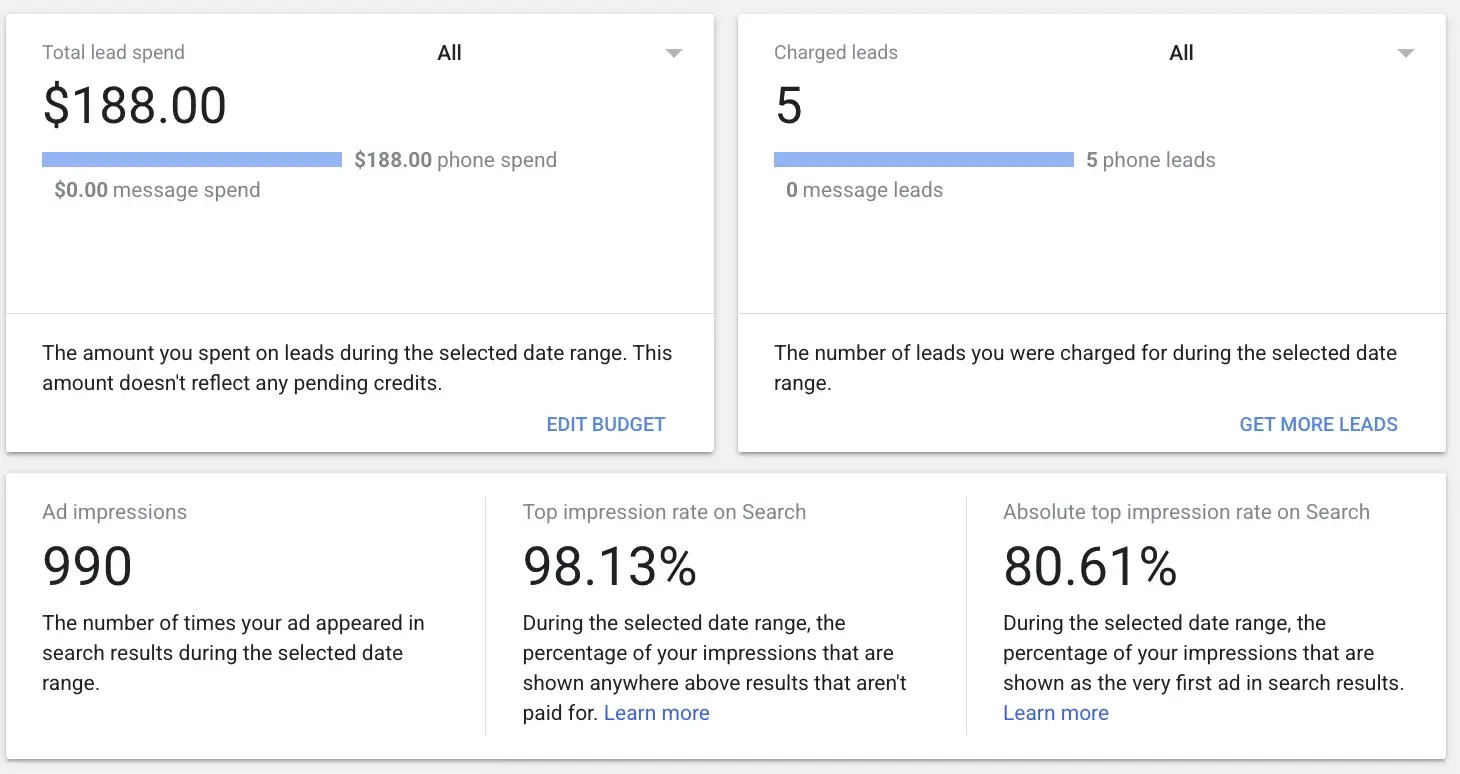
Here's what the main dashboard looks like inside the native platform:
Why pay-per-lead is a good deal (and where the fine print is)
The appeal is easy to see:
You pay for contacts, not clicks
No keyword lists, negatives, or landing pages to manage
Shows above Search ads and organic results
Verified businesses get the Google Verified badge on their ad
Automatic credits for leads Google judges to be invalid or low quality
The fine print matters just as much:
Missed calls can be charged if they land during your business hours and active ad schedule and the caller waits more than 20 seconds.
You don't control which searches trigger your ad. You control categories, job types, and service areas, and Google does the rest.
A charged lead is a contact, not a customer. Someone who calls to ask about a job you don't do can still cost you.
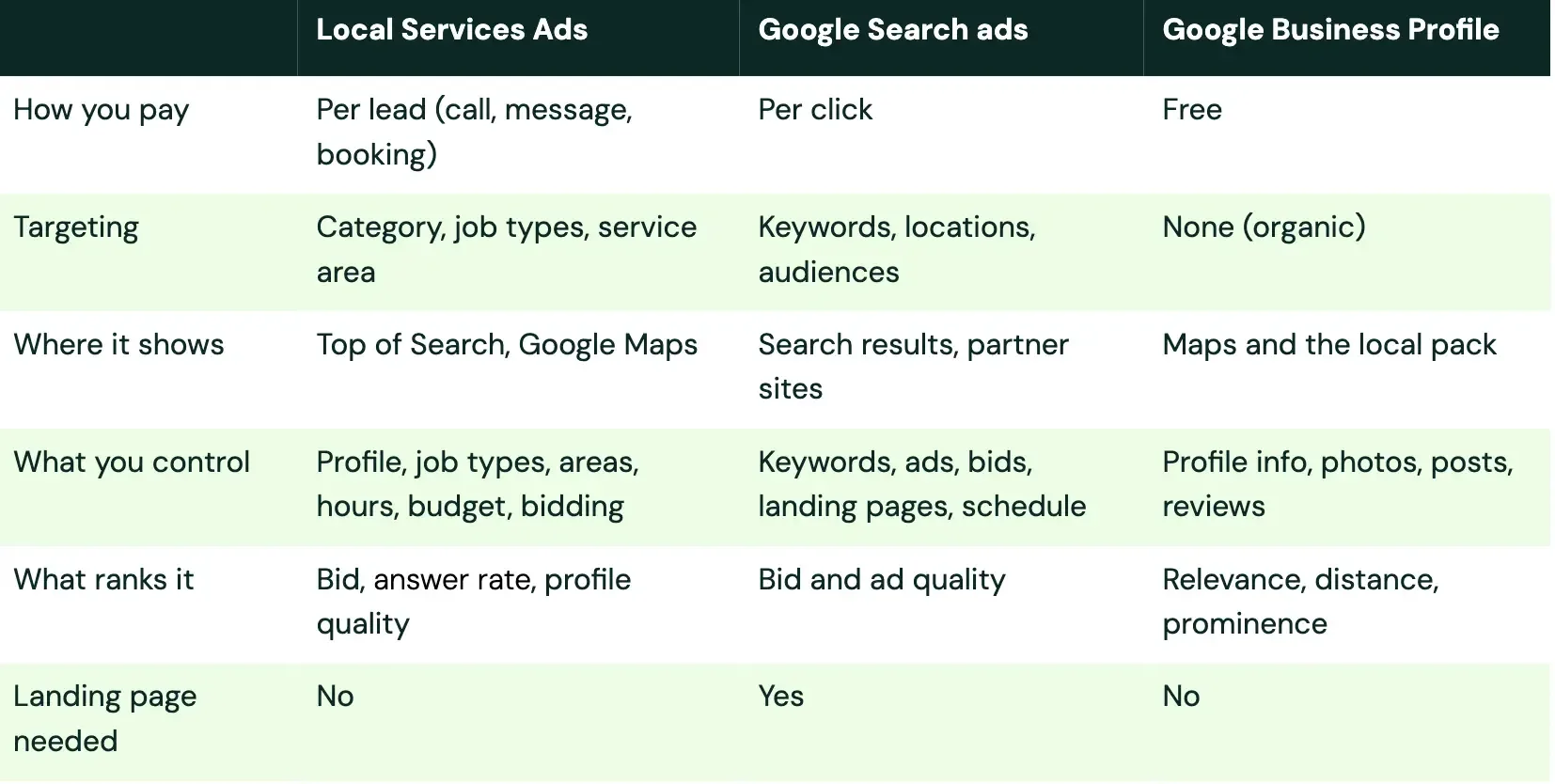
Local Services Ads vs Search ads vs your Business Profile
These three get confused all the time, so here's the short version.
Need someone to run this for you? Get Your Free Proposal.
Who Local Services Ads are for (and who they aren't)
Local Services Ads work best for businesses that sell a local service, can answer the phone, and earn more per job than they pay per lead.
Good fit:
Your category is eligible. In the US, that includes home services, legal, financial planning, real estate, health care, automotive and much more. Some categories are limited to certain states, so check Google's current list.
Someone answers the phone during the hours your ads run.
A single job is worth well more than a lead. A $40 lead is easy math for an HVAC replacement or a personal injury case. (Law firms: our post on paid search for legal services covers the Search side.)
Poor fit:
Your category isn't on the list. No workaround there.
Calls go to voicemail most of the day. Under the new rules, that costs money.
You need tight control over search terms, ad copy or landing pages. Search ads give you that, but Local Services Ads don't.
You have several locations covering the same area and expect each one to show. When multiple locations serve the same area, only the top-ranked one shows (Google Local Services Help, checked October 2026).
A quick gut check before you sign up:
1. Is your business category eligible in your state?
2. Can someone answer calls during every hour the ads will run?
3. Can you pass background checks and show valid licenses and insurance for your category?
4. Is an average job worth at least several times a typical lead price?
5. Will you track which leads turn into booked jobs?
If you answered no to question 2 or 5, fix that first.
Everything else in this post depends on it. If you're a smaller business weighing where to start, our PPC for small and medium businesses page shows how we approach it.
Should you run Local Services Ads and Search ads together?
Usually, yes, because they do different jobs.
Local Services Ads catch people who want to call a provider right now. Search ads let you control the message, test offers, and reach searches Local Services Ads don't cover.
My take: if the budget allows, run both, and judge them on cost per booked job, not cost per lead.
One setting to know: Direct Business Search. When it's on, Local Services Ads can show when someone searches for your business by name. Google only charges for leads from new customers, not returning ones (Google Local Services Help, checked October 2026). You'll find it in the settings screenshot under tip 9.
If you run both, keep an eye on your leads report. In the account in this post, every lead in the table came from a Direct Business search. That's useful to know when you judge cost per lead, because many of those people were already looking for the business.
How Local Services Ads pricing works now
This is where most guides are out of date. Some still describe a badge that no longer exists. Here's what you pay for as of October 2026, straight from Google's lead rules.
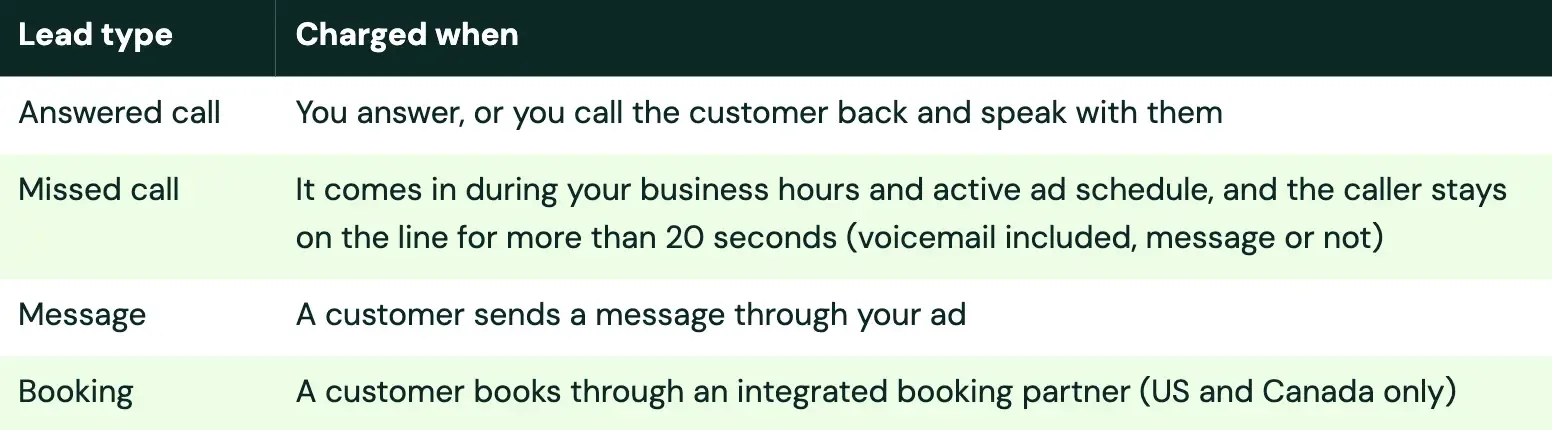
What counts as a charged lead
The 20-second missed-call rule
Unanswered calls are charged when they happen during your active ad schedule and within your business hours, and the caller waits more than 20 seconds. "Business hours" means the hours set in your Google Business Profile.
If you use a phone menu, the timer resets when the caller presses their first key. If the caller hangs up without pressing a key, you aren't charged, even if the menu played for more than 20 seconds.
Message and booking leads
Google says message leads are typically priced lower than phone leads, though not always. The price reflects how likely the customer is to book, including whether they've contacted other Local Services advertisers.
Booking leads are only available in the United States and Canada.
What you won't pay for
Leads Google determines to be invalid or low quality
Missed calls of 20 seconds or less
Callers who hang up at your phone menu before pressing a key
Unanswered calls outside your business hours or ad schedule
Repeat contact from the same customer within 15 days of a charged lead (after 15 days of no contact, a new call counts as a new lead)
Credits replaced disputes
You can't manually dispute leads anymore. Google reassesses leads over about 30 days and credits low-quality ones automatically.
Pro tip: Rating your leads gives Google feedback and may earn you a bonus credit 😉 (Google Ads Help, checked October 2026).
A few things no longer get credits: leads for a job type you don't offer, and leads from outside your service area. Health care and tax specialist advertisers don't receive credits at all.
What drives your lead price
Google says lead prices vary by location, job type, lead type, and bidding mode. There's no universal price list.
I'd be wary of any guide that gives you one without a source. The best estimate I know of is your own first few weeks of charged leads.
Local Services Ads are moving into Google Ads: what changes
Time to talk about moving day.
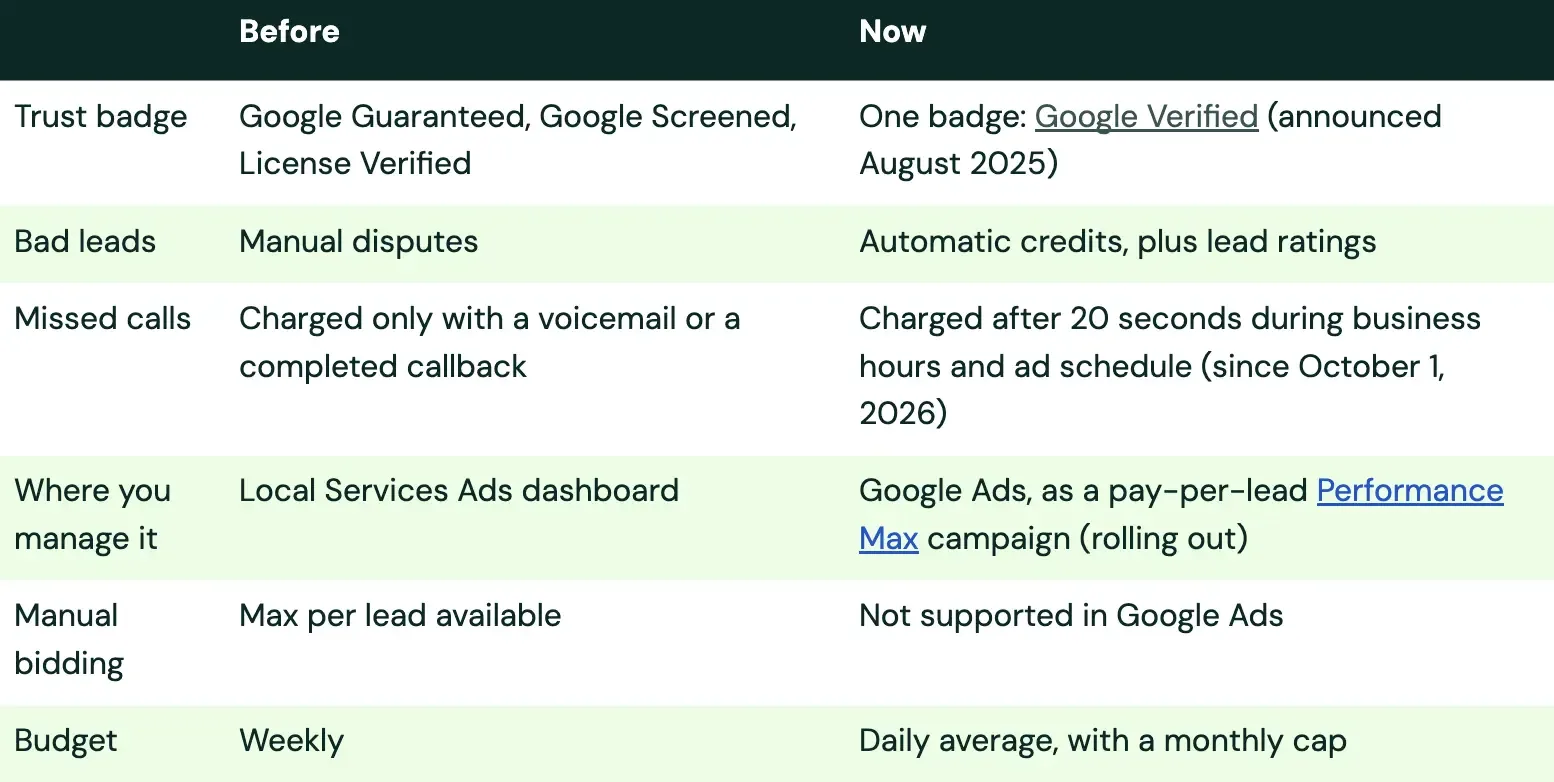
If you manage Local Services Ads for anyone, you've probably seen the notices start landing. Here's the move in plain terms, based on Google's migration page (checked October 2026).
What's changed in Local Services Ads lately
Who moves, and when
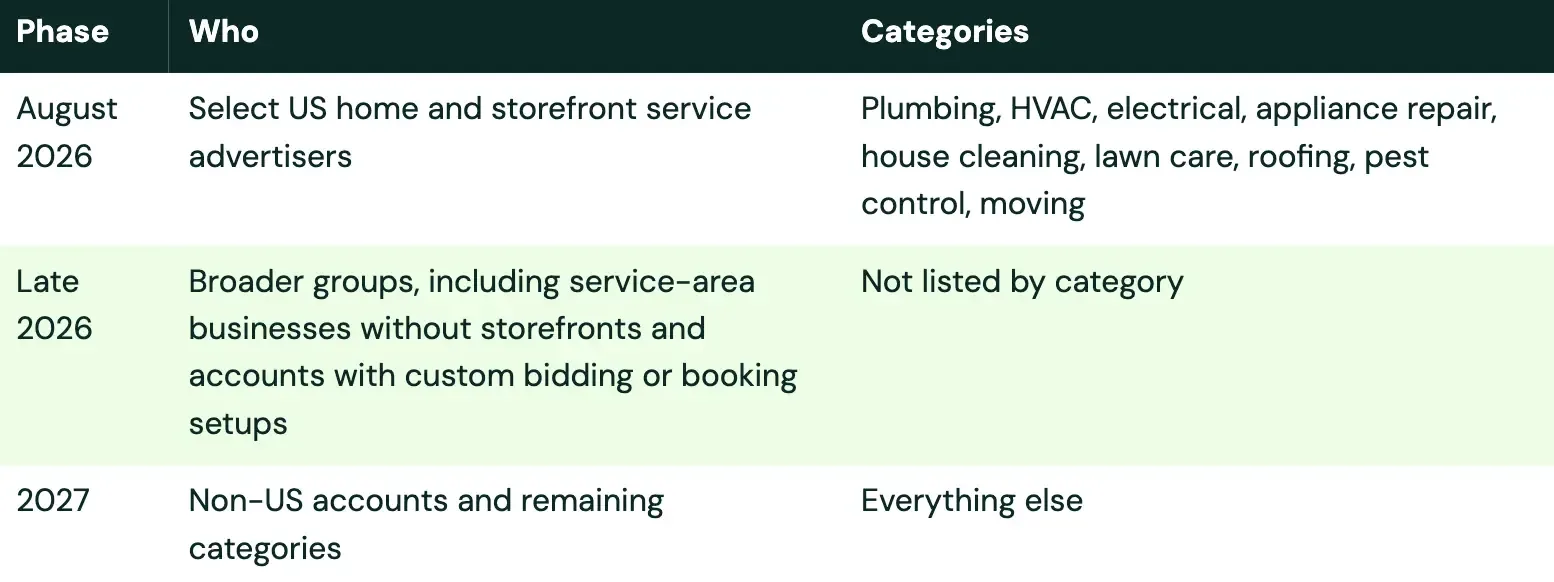
Google sends notice emails 14 days and 7 days before an account migrates.
What changes and what stays
What changes:
Manual bidding goes away. Setting a maximum cost per lead isn't supported in Google Ads.
One Target CPA per campaign. Industry-level Target CPA is being retired, so different verticals need separate campaigns if you want separate targets.
Budgets go daily. Your historical average weekly budget is divided by 7 to set your daily average budget. Monthly spend is capped at that daily average times 30.4.
Old reports don't come with you. Local Services Ads performance reports won't transfer to Google Ads. Download or screenshot them before you migrate.
BBB callouts are going away.
You can't create new pay-per-lead campaigns in Google Ads yet. Existing accounts move over.
What stays:
You still pay per lead
Still no keywords
Same placements on Search and Maps
Your lead history and your verification status and badge carry over
Worked example: converting a weekly budget
Here's the budget math with a hypothetical account spending $700 a week.
Daily average budget = Weekly budget / 7
Monthly cap = Daily average budget x 30.4
$700 / 7 = $100 a day. $100 x 30.4 = a $3,040 monthly cap.
Easy enough.
If your weekly budget bounced around a lot, check the converted number after migration. It's an average of history, not a promise of what you meant to spend.
Your pre-migration packing list
Pack before the truck shows up, not while it's idling in the driveway.
My advice: do this now:
1. Download your performance reports now. They won't transfer.
2. Screenshot your current bids, budgets and settings by vertical.
3. Decide which verticals need their own campaign and Target CPA.
4. Check your business hours against your real phone coverage.
5. Refresh your photos and profile while you're in there.
6. Watch for the 14-day and 7-day notice emails.
Questions to ask whoever runs your Local Services Ads account:
- Are we verified, and is the Google Verified badge showing?
- Which hours do our ads run, and which hours does someone answer the phone?
- When do we migrate, and how will our verticals be split into campaigns?
- How many leads were credited last month, and are we rating our leads?
- Do our Local Services Ads leads land in our CRM, matched to booked jobs?
If you'd rather not handle the move alone, Workshop Digital can review your Local Services Ads account, phone coverage, and migration plan.
12 Local Services Ads best practices for better leads
Here are the 12 at a glance. Each one helps your ranking, your cost per lead, your lead quality, or some mix.
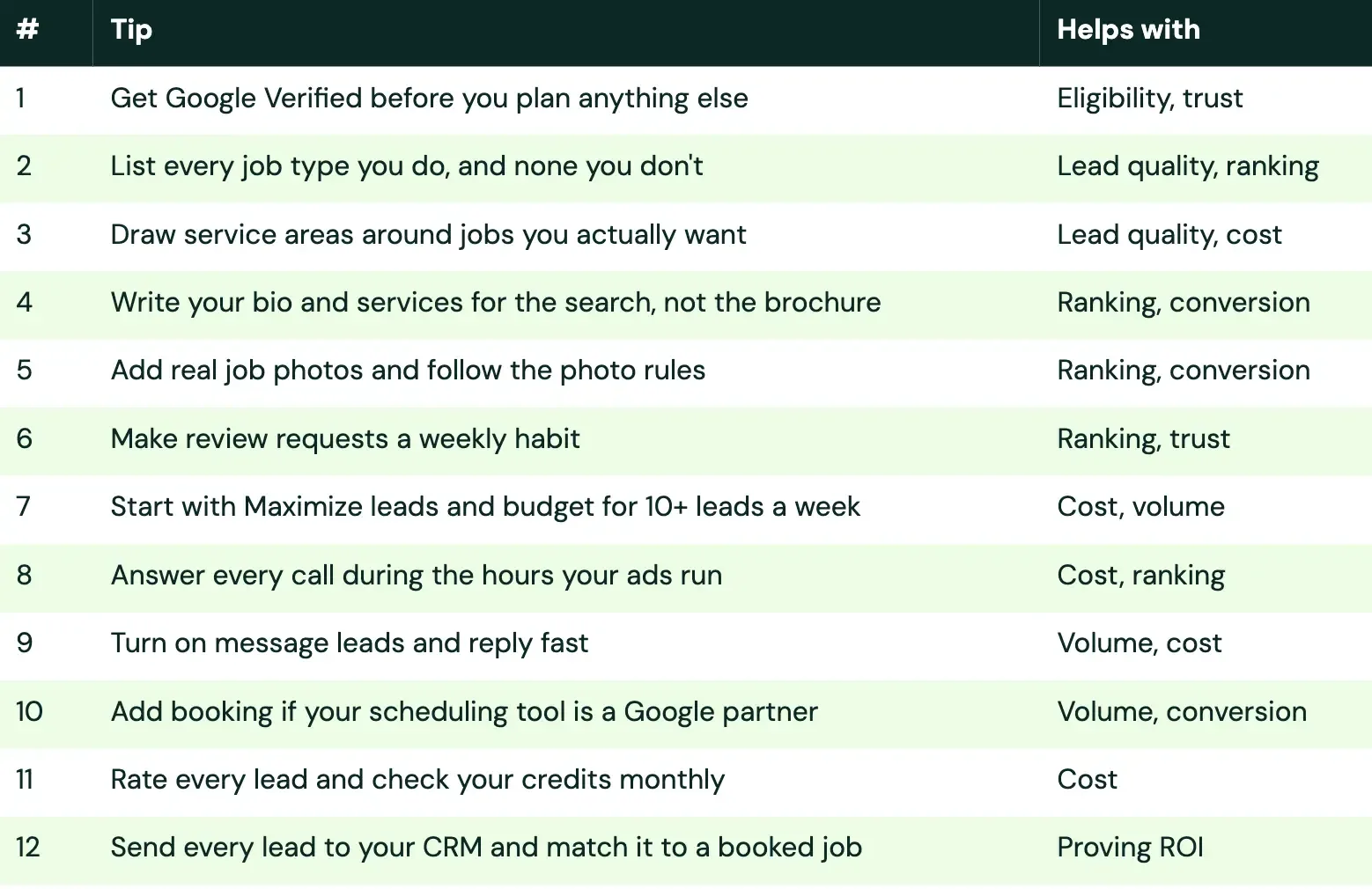
1. Get Google Verified before you plan anything else
No verification, no ads. (Mostly. More on that below.)
Google Verified replaced Google Guaranteed, Google Screened, and License Verified, and Google says the change doesn't affect ranking (Google Local Services Help, checked October 2026).
What you'll need depends on your category. It can include background checks for owners and consumer-facing employees, state licenses (a bar license for lawyers), and proof of insurance. Google runs background checks through a partner called Evident. Insurance documents must be active and valid for at least 14 days after you submit them (Google Local Services Help, checked October 2026).
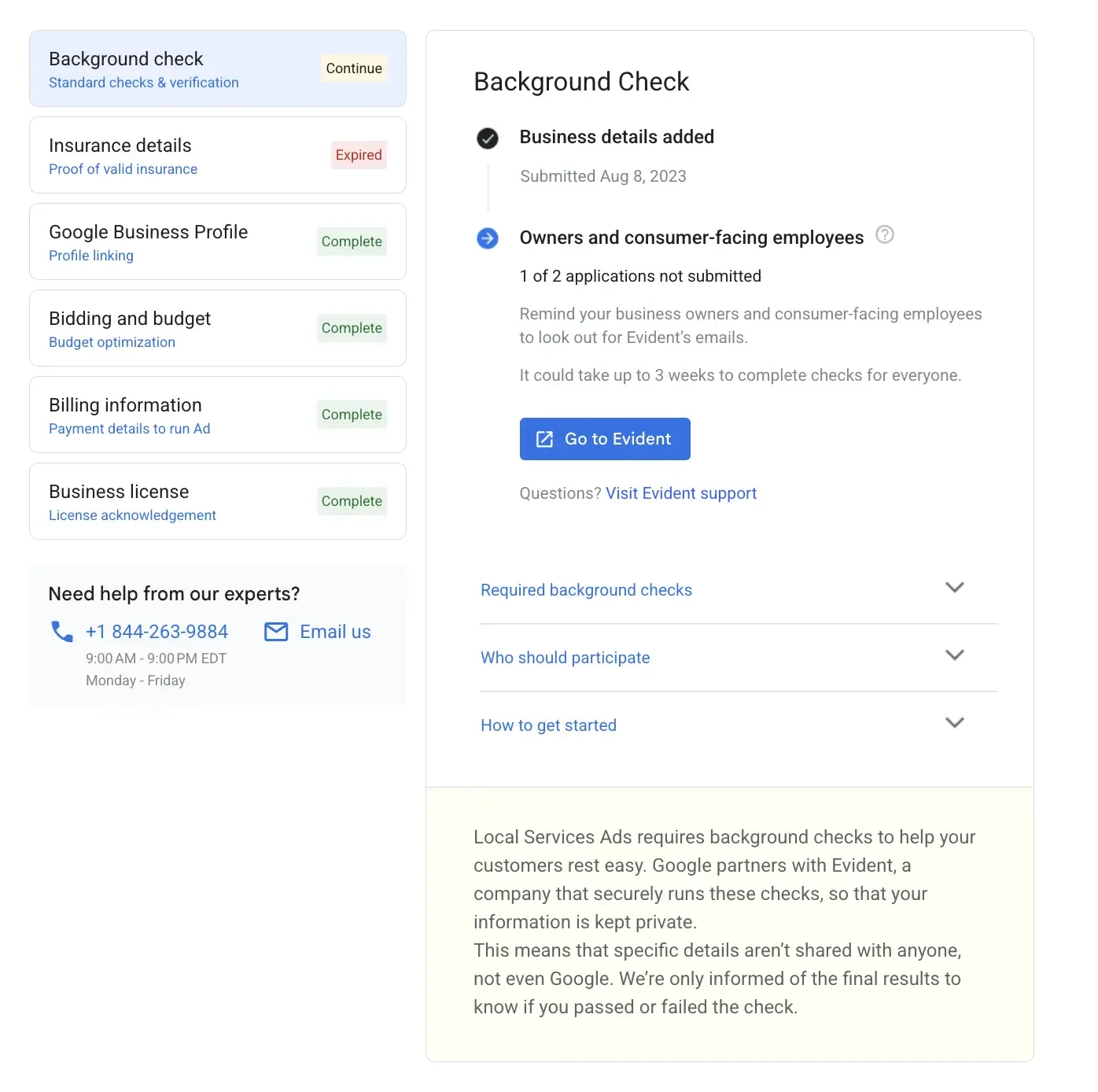
I've taken home service companies and law firms through this process, and law firms tend to be the roughest. Budget extra patience… and coffee.
Start early, and send the background check invitations the same day you sign up.
Verification also isn't one and done.
Google says you may be asked to repeat checks, and that failing to do so can mean losing your badge, a pause on your ads, or account suspension. Put license and insurance expiration dates on a calendar, and set reminders.
Some categories can run ads after preliminary checks while verification finishes. Garage door, health care, and locksmith businesses can't (Google Local Services Help, checked October 2026).
2. List every job type you do, and none you don't
Job types are your targeting.
They tell Google which searches your ad is eligible for, and the services you offer feed into ranking.
Go through each industry on your account and turn on only the jobs you actually want. Leads for a job type you don't service no longer get credited, so a careless toggle now costs real money.
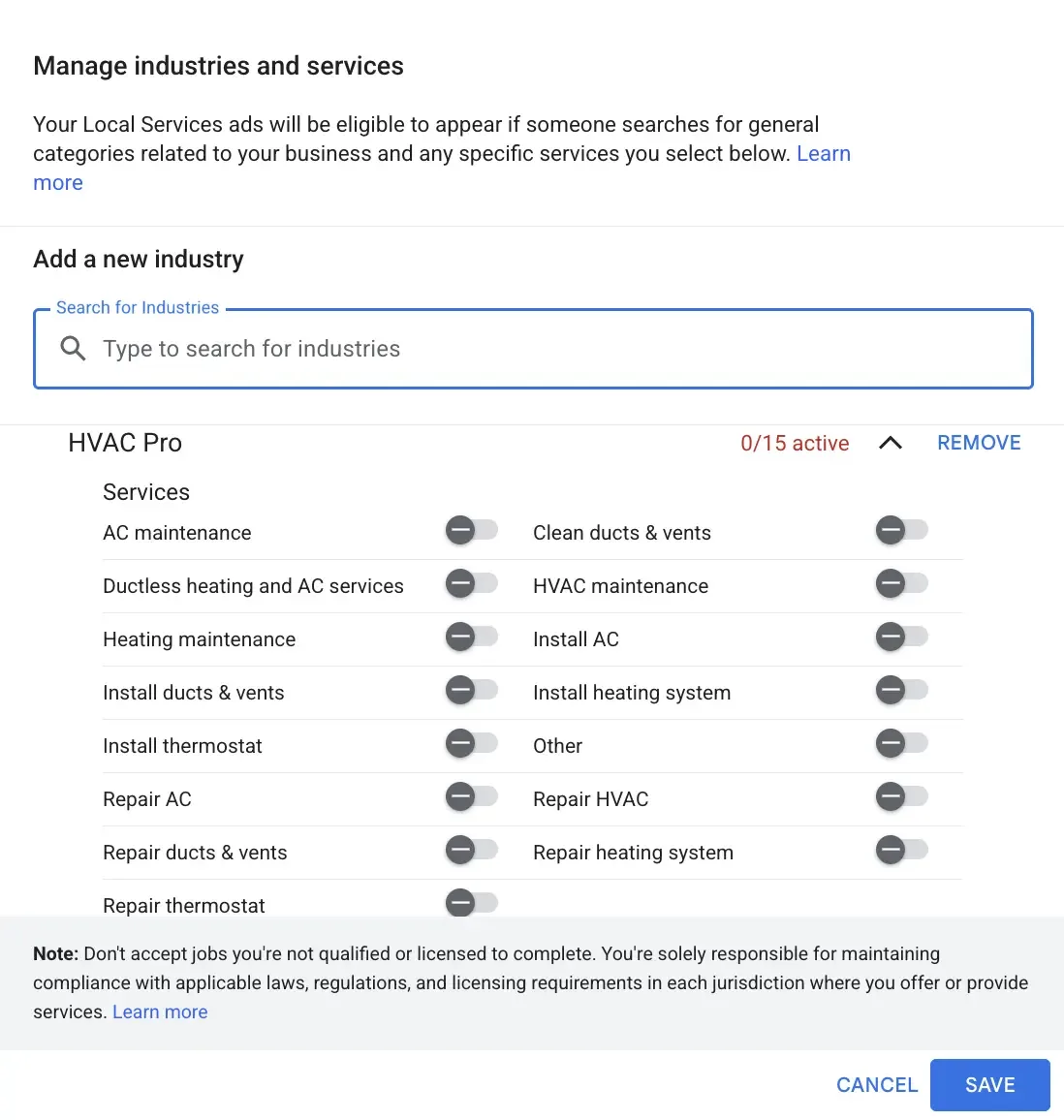
My advice: talk to the business owner here, not just the office manager. Ask which jobs they want more of, which they'd rather refer out, and which ones they'd take but don't love. That conversation shapes the whole account.
"Just in case" is not a targeting strategy.
3. Draw service areas around jobs you actually want
Your service area tells Google where you'll take work. You can add counties, cities, neighborhoods or ZIP codes, and exclude areas inside them.
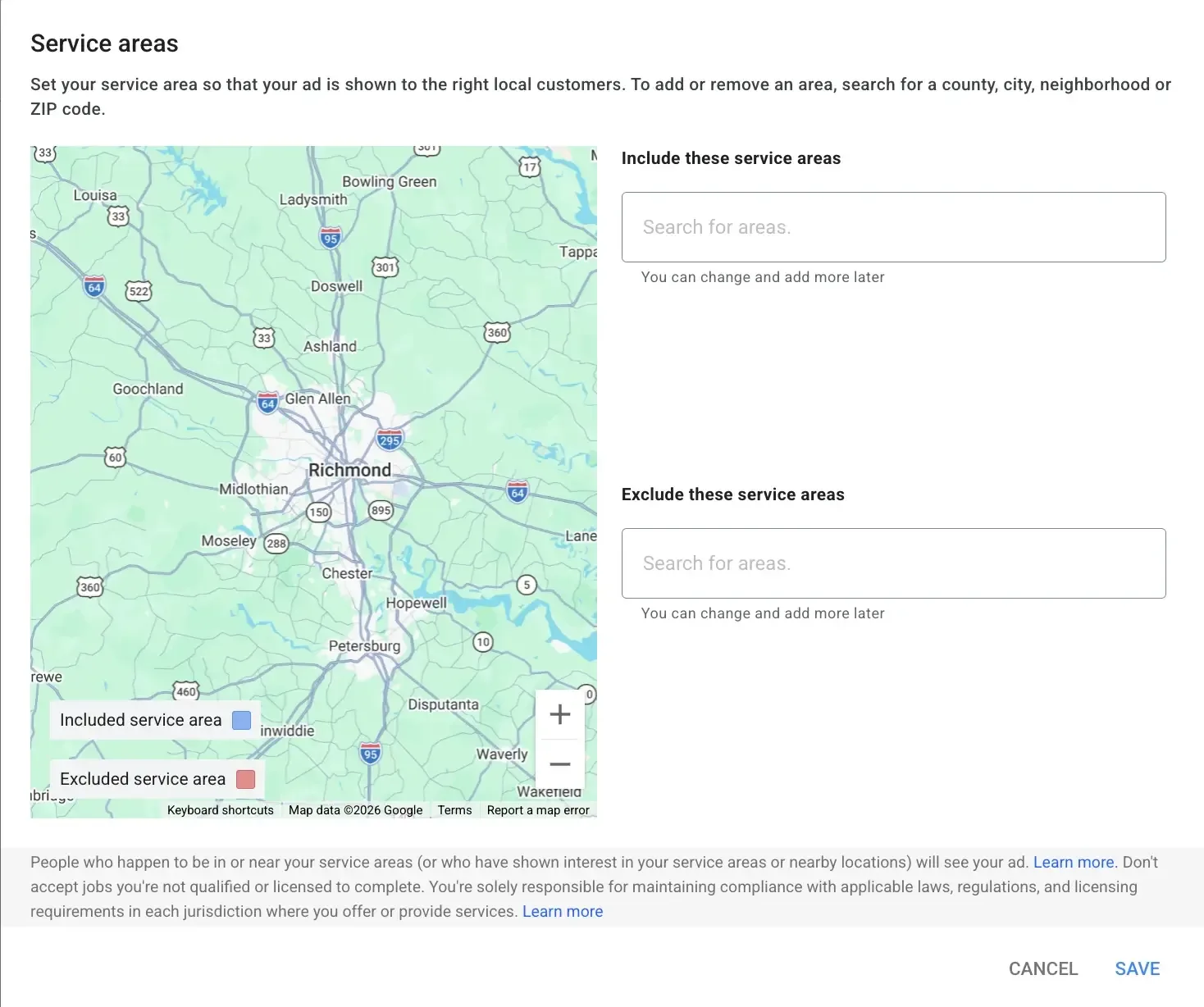
Leads from outside your service area no longer get credited, so be honest about where you'll actually take work. If the owner won't drive 45 minutes for a small job, leave that area out.
Your service area is a promise, not a wish list.
Don't shrink your areas just to rank higher, either. Distance isn't on Google's published list of ranking factors (Google Local Services Help, checked October 2026).
4. Write your bio and services for the search, not the brochure
Google uses the relevance of your services and your business bio to decide when to show you.
Your bio is also what a customer reads right before they decide to call.
Say what you do, where you do it, and what makes you different, in plain words a customer would use.
Here's how I'd rewrite a typical bio. This is a hypothetical example for a plumbing company:
Before: "Family-owned since 1998. We pride ourselves on excellence and customer satisfaction in everything we do."
After: "Family-owned plumbers serving Tampa and St. Petersburg. Water heaters, drain cleaning, and leak repair. Same-day appointments most weekdays. Upfront pricing before we start."
Only list what's true.
Same-day service and upfront pricing are great, if the business really offers them.
5. Add real job photos and follow the photo rules
In a Google test with US and Canadian home service providers, those who uploaded at least one photo saw an average of 16% more leads than those with none (December 2023 to January 2024) (Google Local Services Help, checked October 2026). The dashboard itself pushes for more.
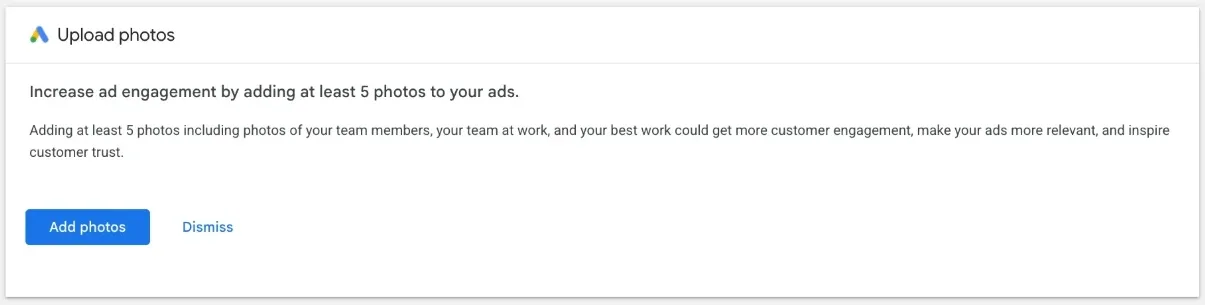
Follow the rules so your photos actually show (Google Ads policy, checked October 2026):
At least 640 x 640 pixels
No phone numbers, email addresses, street addresses, or another business’s watermarks
No AI-generated or AI-edited images if you advertise in the EU or New York State (since August 2, 2026)
Real photos of real crews beat polished stock images. Customers can tell the difference.
Nobody ever hired a plumber because of a stock photo of a guy giving a thumbs up.
6. Make review requests a weekly habit
Your star rating and number of reviews both affect ranking (Google Local Services Help, checked October 2026). Reviews are now managed through your Google Business Profile.
Make asking part of the job, not a once-a-year push:
Send the review link by text right after the job is done
Make it one tap. Nobody hunts for a review page
Reply to every review, good or bad
Our Google Business Profile optimization guide covers reviews and the rest of your profile in more detail, and our local SEO team can help you build the habit.
7. Start with Maximize leads and budget for 10+ leads a week
There are three bidding options in the Local Services Ads dashboard today: Maximize leads (Google's recommendation), Maximize leads with an optional target cost per lead, and manual bidding with a max per lead.
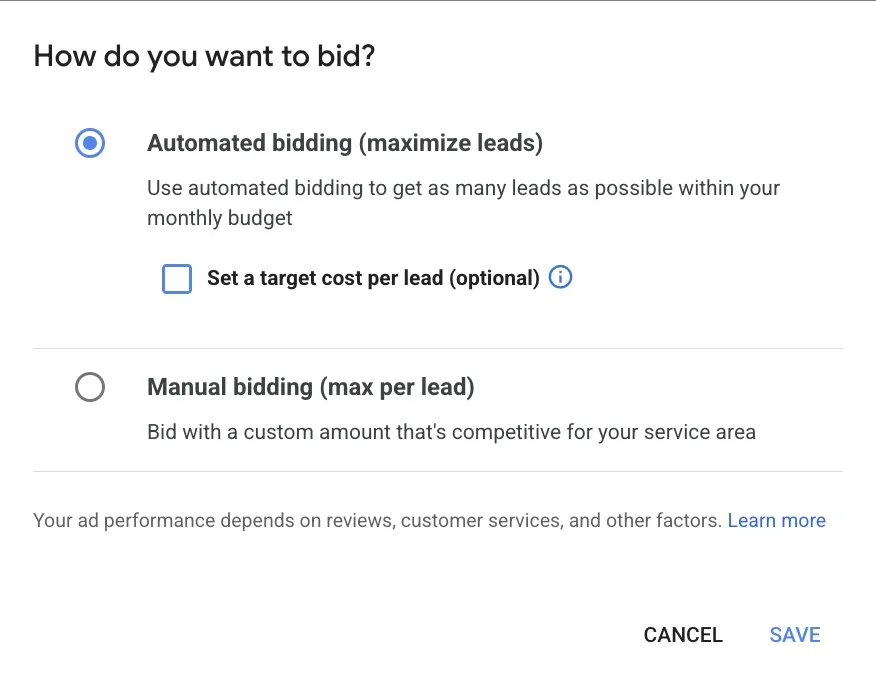
Google recommends a budget that covers at least 10 leads per week, and says to expect about 2 weeks of learning (Google Local Services Help, checked October 2026).
Weekly budget = Expected lead price x Leads per week
With a hypothetical $40 lead price, 10 leads a week means a $400 weekly budget.
Since manual bidding is retired in Google Ads, I'd get comfortable with automated bidding now. Add a target cost per lead only after you have a few weeks of real lead prices to base it on.
Manual bidding had a good run 🥲
8. Answer every call during the hours your ads run
This is the tip I'd put first if I could only give one.
Missed calls happen a lot, and now they cost money.
Google also says missed calls may hurt your responsiveness, which is part of how ads are ranked (Google Local Services Help, checked October 2026).
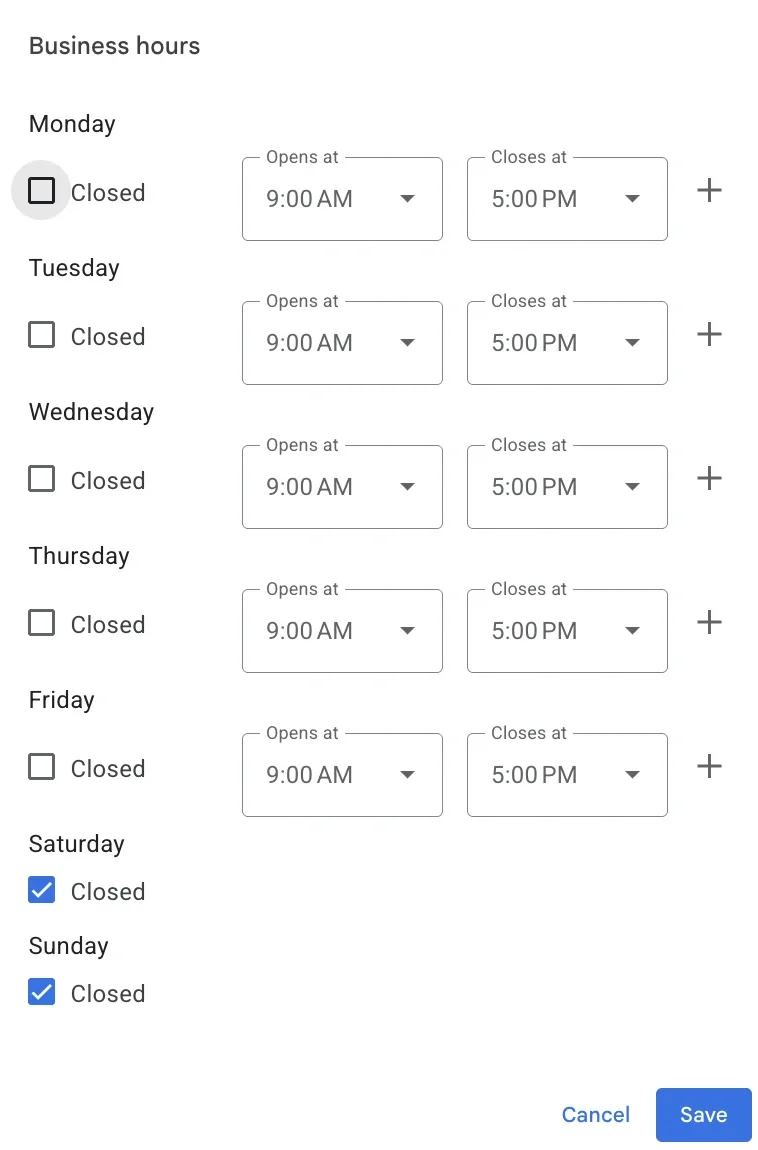
New house, same doorbell. Someone still has to answer it.
Here's how I handle it with my clients:
Talk to the business owner about who answers the phone, and when. Don't assume.
If the office can't answer every call, use a call answering service. The goal is 100% of calls answered (it will affect your ad rank if you miss calls)
If nobody can pick up after 4 p.m. or on Saturdays, don't run ads then. Set your ad schedule to the hours when someone is actually there
A lead you can't answer is a lead you pay for and lose. Fix phone coverage before you touch bids.
I'd rather see an account with a smaller budget and every call answered than a big budget feeding a voicemail box.
Further reading: Maximizing call leads with effective digital marketing.
9. Turn on message leads and reply fast
Message leads let customers text or email you through your ad. Google says they're typically priced lower than phone leads, and turning them on doesn't turn off calls.
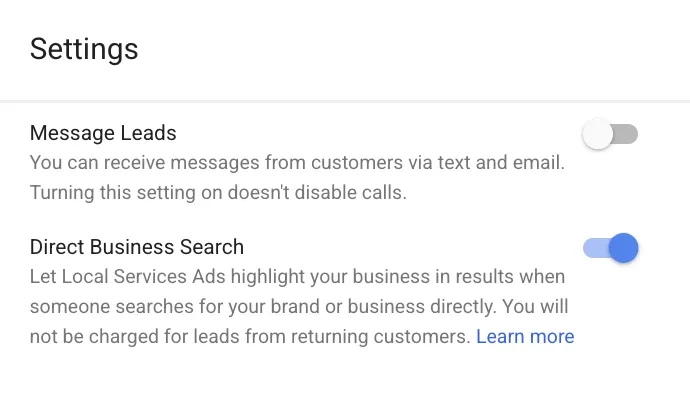
Turning on messages or booking also counts toward your likelihood of getting a lead, one of Google's ranking inputs (Google Local Services Help, checked October 2026).
If I had to pick one setting to test first on an account that has it off, it's this one.
Speed matters here. Once you've had at least 2 message leads in 90 days, Google may show customers an estimate of your response time (Google Local Services Help, checked October 2026). Turn on email or text alerts so a message never sits overnight.
10. Add booking if your scheduling tool is a Google partner
Booking leads let customers book an appointment straight from your ad. They're available in the US and Canada only, and you turn them on through an integrated booking partner (Google Local Services Help, checked October 2026).
If your scheduling software is on Google's partner list, I think it's worth testing. A customer who books a time is further along than one who leaves a voicemail.
Check how bookings land on your end before you turn it on. A booking nobody confirms is the calendar version of a missed call.
11. Rate every lead and check your credits monthly
Credits are automatic now. Your attention still isn't.
Google reassesses leads for about 30 days, credits the low-quality ones, and uses your lead ratings as feedback (Google Ads Help, checked October 2026).
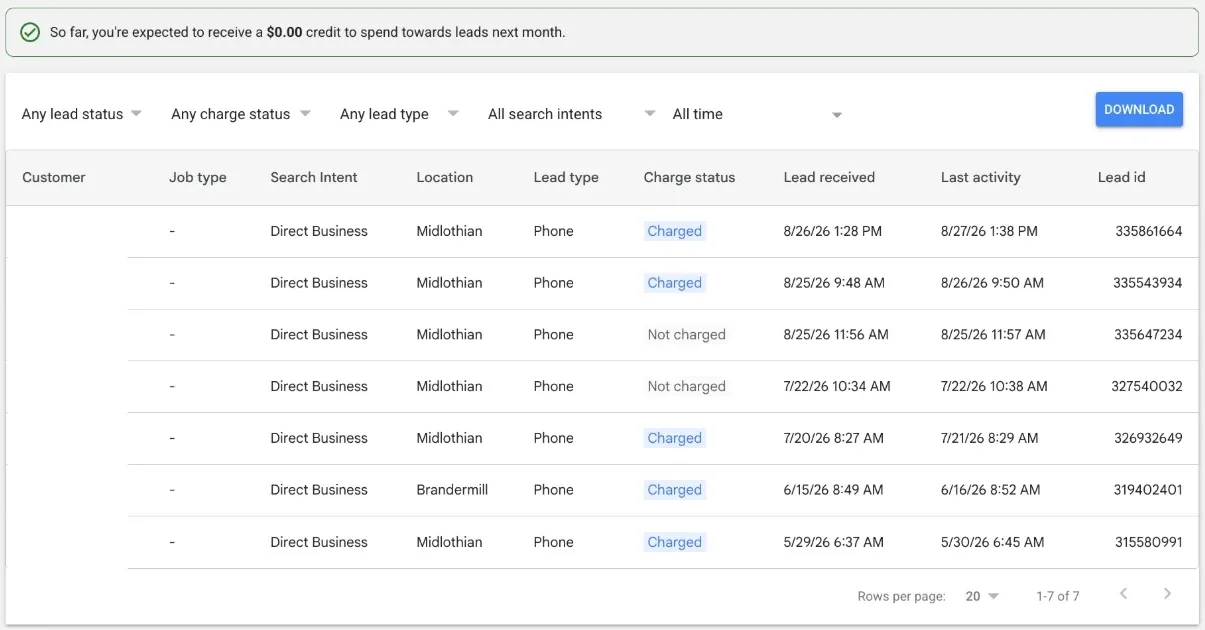
Once a month:
1. Filter by charge status and look at every charged lead
2. Rate each one
3. Check the expected credit banner
4. Look at the Search Intent column to measure where you are generating the most leads
12. Send every lead to your CRM and match it to a booked job
Credits tell you whether a lead was valid.
They don't tell you whether it made money. Only your CRM can do that, and it's what I'd look at first to judge whether Local Services Ads are working.
Use the Download button in the leads view (or your call tracking) to get leads into your CRM, then match each one to a booked job and its revenue. Here's the chain you want:
1. Lead comes in (call, message or booking)
2. Lead is logged in the CRM with its source
3. Lead becomes a booked job, or doesn't
4. Booked job gets a revenue number
With that in place, you can compare cost per booked job across Local Services Ads, Search ads, and everything else. Our posts on closed-loop reporting and lead-to-sale mapping walk through the setup, and our analytics and attribution team builds it for our clients.
Local Services Ads mistakes that waste money
These are the ones I'd fix first on any account.
Running ads during hours nobody answers
Turning on every job type “just in case”
Waiting for the migration email to save your reports
Keeping one campaign for every vertical after migration
Never rating leads or reporting on booked jobs
Before moving day: what to do with your Local Services Ads now
Match your ad schedule to the hours someone can answer the phone. Missed calls over 20 seconds during those hours can now be charged
Rate your leads and check your credits once a month. Disputes are gone
Put license and insurance renewals on a calendar so your Google Verified badge doesn't lapse
Download your reports and screenshot your settings before your migration notice arrives. Old reports won't transfer, and manual bidding goes away
Tighten up job types, service areas, photos, and reviews. They do most of the heavy lifting
Your phone is now part of your bid.
Get your account ready before the switch
If your Local Services Ads account is about to migrate, or your phone goes to voicemail after 4 p.m., that's exactly the kind of thing our Local Services Ads team digs into at Workshop Digital. Get Your Free Proposal, and we'll review your profile, phone coverage, and migration plan before the switch.
Moving day is coming whether you've packed or not. Might as well label the boxes.
Read next: Measuring the impact of Google Ads for local businesses.